




Registration for Fall Sports opens on July 1st, 2025. Winter and Spring Sports registration will open one month before the season begins. All participants need to be registered through RevTrak and have a current physical on file with the athletics office before they can participate. The following table lists the sports offered at Longmont High and their season start dates.
| Fall Sports 8/11/25 | Winter Sports 11/17/25 | Spring Sports 2/23/26 |
| Boys Golf (8/4/25) Boys Soccer Boys Tennis Cross Country Football (8/4/25) Volleyball | Girls & Boys Basketball Girls Swim Wrestling | Baseball Boys Swim (2/16/26) Girls Golf Girls Soccer Girls Tennis Track & Field |
In order to try out or practice for Trojan athletics, the following must be completed online:
- Register for Longmont High School Athletics. Students need to register online for LHS Athletics by clicking this link and selecting the desired sport. This online registration includes all necessary student/parent signatures required for athletic participation.
- Pay the Athletic Participation fee of $150 ($200 for football). The student will be prompted for payment at the end of the online form and will be able to pay by check or credit card. (Free/Reduced lunch program discounts will be automated; if you qualified last year, you will need to reapply when the 2025-26 school year begins. Adjusted amounts will appear in the shopping cart).
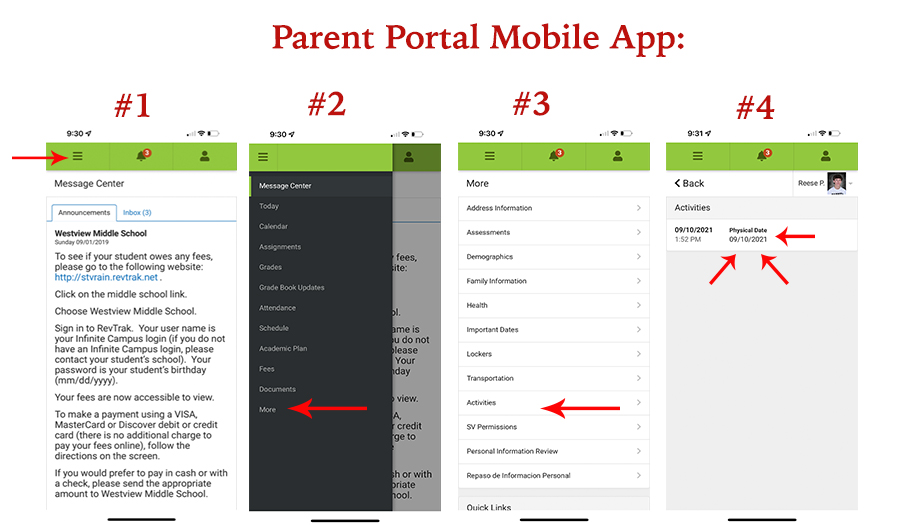
- Students must have a valid sports physical signed by a doctor, clearing the athlete for participation. This Physical Form is required by CHSAA. Only Page 4 should be turned in to the school. Make sure Page 4 is filled out completely before uploading to avoid any delays in participation. Physicals are valid for one year from the date signed by the physician. Once your form is signed, upload your physical form here. You can check your student’s current athletic physical date on file by going to the Parent Portal Infinite Campus app on your device and follow these steps: #1 Select the Menu button in the top left corner of the app. #2 Select More, and then #3 select Activities. #4 The most recent physical on file with LHS Athletics will be listed. See image below for instructions.
Please click here for a list of coaches and their contact info.